 Milksy Get Milksy
A useful log starts with the right fit
Which baby tracker
fits your day?
Milksy, Nara Baby, Huckleberry and Baby Tracker all record everyday care. The best baby tracker app for your family depends on your phones, the details you need and how much guidance you want.
Last updated: · By Milksy · Sources & method
The everyday details, compared
We make Milksy, so this guide explains our perspective and the places another app may be a better choice. Features below are documented; ease and complexity are our assessment. This is Baby Tracker by Nighp Software.
| What matters | Milksy | Nara Baby | Huckleberry | Baby Tracker (Nighp) |
|---|---|---|---|---|
| Feeding tracking | Bottles, nursing and pumping | Bottles, nursing, pumping and solids | Feeding and pumping logs | Bottles, nursing, pumping and solids |
| Breastfeeding | Left/right timer; pause and switch sides | Left/right timer and last side | Timer for both sides | Nursing timer and last side |
| Bottle tracking | Amount in mL and time | Amount and time | Bottle feeding logs | Formula and expressed milk logs |
| Diaper tracking | Wet, dirty or dry | Wet, dirty or dry; rash logging | Diaper change logs | Wet, dirty or mixed |
| Sleep tracking | Sleep logs and trends | Sleep timer and graphs | Sleep logs; paid sleep guidance | Sleep timer; optional paid timing cues |
| Growth tracking | No weight, height or head-size charts | Weight, height and head size | Growth and weight tracking | Measurements and WHO growth charts |
| Trends / statistics | Feeds, volume, diapers and sleep | Activity trends and sleep graphs | Basic reports free; enhanced reports paid | Charts and daily / weekly / monthly reports |
| Partner / caregiver support | Private iCloud family invitation | Caregiver invitations | Caregivers sign into the same account | Multiple devices in a sync group |
| Sync | Apple CloudKit; both parents need iCloud | Across caregivers and devices | Automatic device sync via shared login | Device sync; verify current setup in app |
| Logging controls | Plus menu, amount controls and timers | Timers; hide unused activity types | One-touch tracking; paid text / voice / photo logging | Timers, Siri Shortcuts and Quick Log on supported devices |
| Platforms | iPhone / iPad; iOS / iPadOS 26.5+ | iPhone, Apple Watch and Android | iPhone, iPad, Apple Watch and Android | iPhone, iPad, Apple Watch and Android |
| Pricing | Check the current App Store price | US listing: $9.99 monthly; $69.99 lifetime. Check in-app eligibility. | Free logging. Website: Plus $5.74/mo; Premium $9.99/mo, each billed yearly. | Free core logging. US listing: remove ads $4.99; Plus $5.99/mo or $49.99/yr. |
| Ads | No in-app ads | Android description says ad-free; current in-app experience unverified | Not confirmed from reviewed sources | Advertising listed; paid ad removal available |
| Account requirements | No separate Milksy login; iCloud for sharing | Nara account for caregiver invitations | Huckleberry account; shared login for caregivers | Current login requirements not confirmed |
| Ease of loggingOur assessment | Designed for short entries from Today | Adjustable activity list may suit a wider routine | More logging methods if you choose Plus | Many shortcuts alongside detailed records |
| Overall complexityOur assessment | Focused daily log | Broader baby and parent journal | Logger plus optional guidance tools | Detailed logger, charts and optional cues |
Prices are in USD, checked on 3 October 2026. Check current local purchase terms. Read the sources and qualifications.
Different apps, different priorities
Milksy: the daily handover
For parents on iPhone or iPad who want a focused timeline, short care entries and iCloud sharing. No Android version or growth measurement charts.
Explore Milksy’s feeding log →Nara: baby and parent together
For families who want pregnancy and postpartum journals beside baby activity and growth records. Unused activities can be hidden.
Milksy vs Nara Baby →Huckleberry: tracking with guidance
For parents who want free basic tracking, with the option to pay for sleep predictions and personalized plans.
Milksy vs Huckleberry →Baby Tracker: detail and reports
For families who want measurement charts and PDF reports alongside care logs. Core tracking is free; ads and paid extras deserve a look.
Milksy vs Baby Tracker →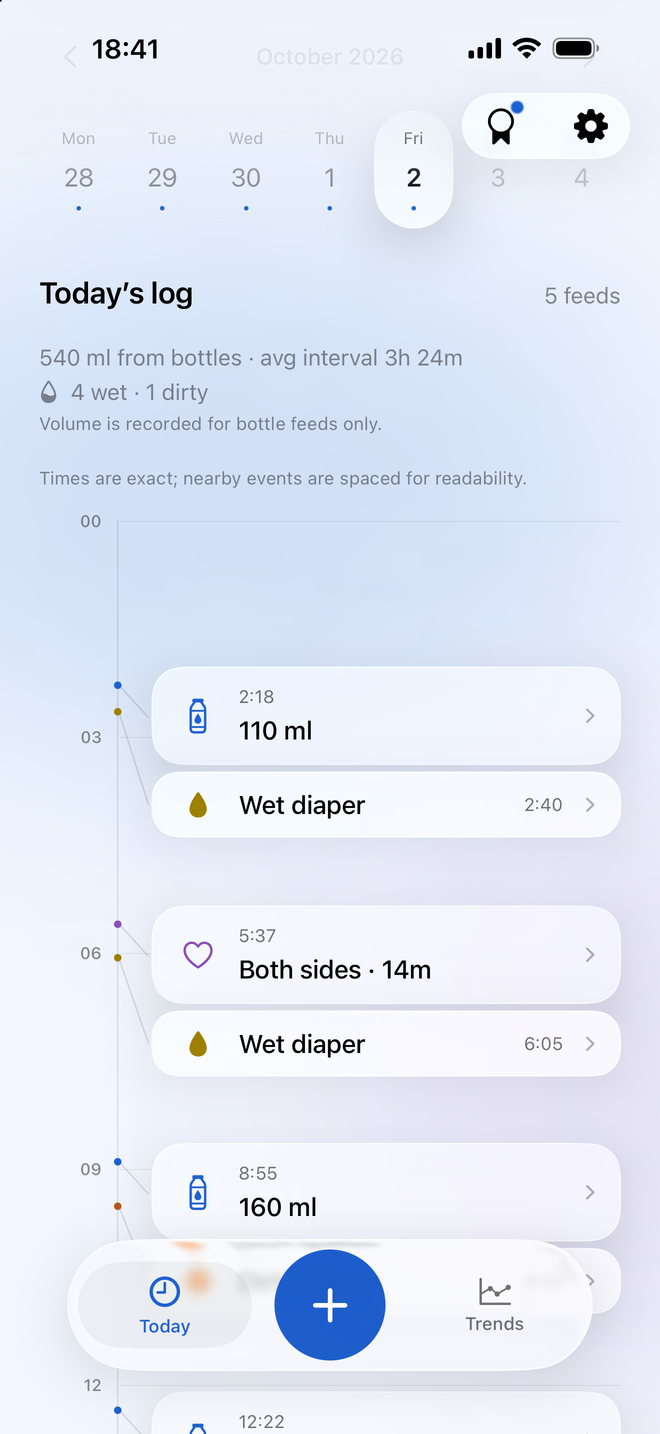
Choose by a real handover
Log a feed, change its time, then have your partner find it on their phone. That small trial tells you more about fit than a long feature list.
If you need a baby feeding tracker for couples, start with how Milksy shares a timeline. If one parent uses Android, consider one of the other apps here.
Useful questions
What is the best baby tracker app?
There is no single best choice for every family. Start with your devices, sharing needs and the records you want. Milksy focuses on a daily care timeline; Nara includes parent journals; Huckleberry adds paid sleep guidance; Baby Tracker offers detailed charts and reports.
How do I choose a simple baby tracker app?
Try logging a bottle, timing a nursing session and correcting an earlier entry. Look for the details you use every day without assuming that more features always mean more work. Nara can hide unused activities, and other apps offer shortcuts.
Which baby feeding tracker works for couples?
All four apps document caregiver or multi-device sharing. Milksy uses iCloud invitations, Nara supports caregiver invitations, Huckleberry shares an account login, and Baby Tracker uses sync groups. Test the setup on both parents’ devices before relying on it.
Sources and how we compare
Last updated: . We make Milksy. Competitor facts come from the official pages below; Milksy details come from its current implementation. This is a comparison of documented features, not a timed usability or sync test. “Ease of logging” and “Overall complexity” are our assessment.
Prices are the US listing or website figures shown when checked, in USD. Offers, taxes, eligibility and Android pricing can differ. A free download does not promise free access to every feature. Check the app’s purchase screen before paying. Unconfirmed details are marked in the table.
- Nara Baby — US App Store listing
- Nara Baby — Google Play listing
- Huckleberry — US App Store listing
- Huckleberry — official pricing and sharing FAQ
- Huckleberry — Google Play listing
- Baby Tracker by Nighp — US App Store listing
- Nighp — official product overview
For Milksy’s storage and sharing details, see privacy and family sharing. Compare interfaces using the real Milksy screen on this page and each competitor’s official store screenshots.
A little less to remember.
Milksy is for parents who want to track the useful stuff without turning baby tracking into another job. See whether its daily timeline feels right for you.
See Milksy on the App Store