 Milksy Get Milksy
A record of the day, or help planning the next nap?
Milksy vs Huckleberry
Huckleberry is the stronger fit if you want sleep predictions and guidance, with those tools in paid memberships. Its basic tracker is free. Milksy may suit you if you want to log the day, share it with your partner and review patterns without sleep predictions.
Last updated: · By Milksy · Sources & method
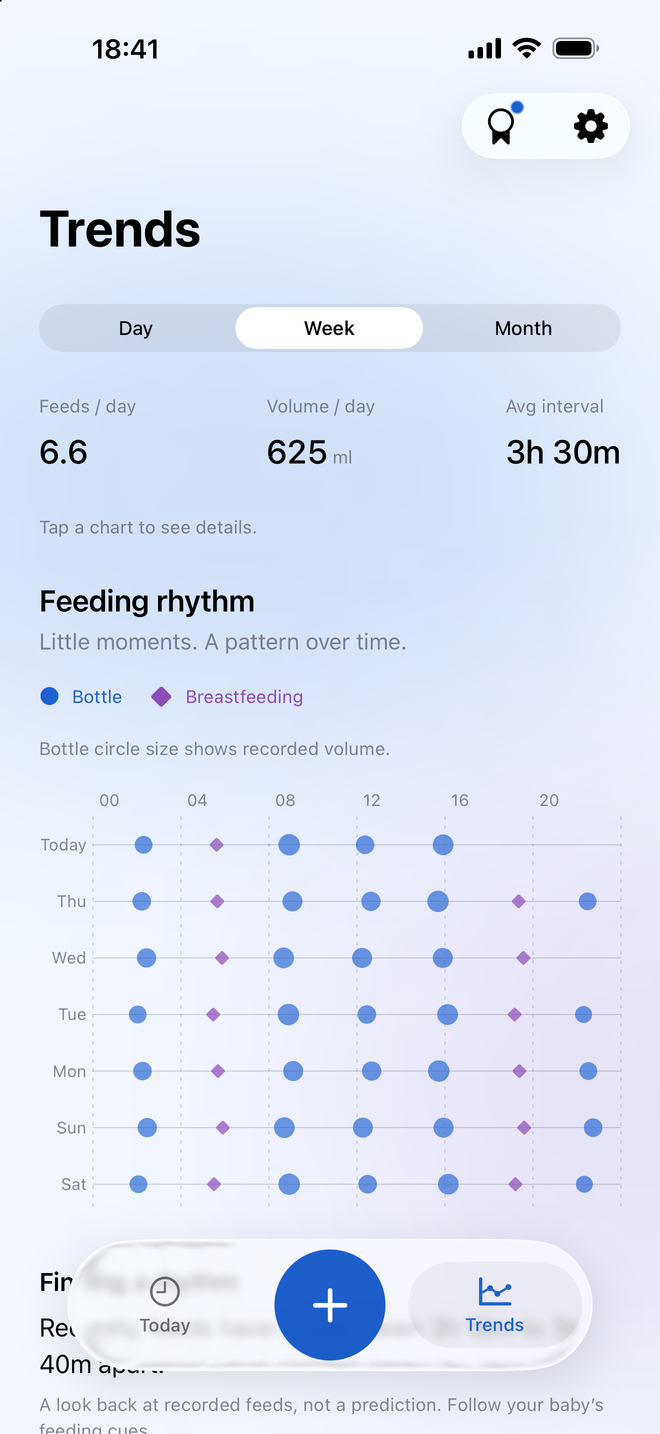
Looking back at what happened
Milksy’s Trends summarize your saved records. Huckleberry combines tracking with optional planning and guidance tools. Decide whether you want a history, suggestions, or both.
See Huckleberry’s official screenshotsMilksy and Huckleberry, side by side
Start with the features you need. A longer list only helps if you will use it.
| What matters | Milksy | Huckleberry |
|---|---|---|
| Feeding tracking | Bottles, nursing and pumping | Feeding and pumping logs |
| Breastfeeding | Left/right timer; pause and switch sides | Timer for both sides |
| Bottle tracking | Amount in mL and time | Bottle feeding logs |
| Diaper tracking | Wet, dirty or dry | Diaper change logs |
| Sleep tracking | Sleep logs and trends | Sleep logs; paid sleep guidance |
| Growth tracking | No weight, height or head-size charts | Growth and weight tracking |
| Trends / statistics | Feeds, volume, diapers and sleep | Basic reports free; enhanced reports paid |
| Partner / caregiver support | Private iCloud family invitation | Caregivers sign into the same account |
| Sync | Apple CloudKit; both parents need iCloud | Automatic device sync via shared login |
| Logging controls | Plus menu, amount controls and timers | One-touch tracking; paid text / voice / photo logging |
| Platforms | iPhone / iPad; iOS / iPadOS 26.5+ | iPhone, iPad, Apple Watch and Android |
| Pricing | Check the current App Store price | Free logging. Website: Plus $5.74/mo; Premium $9.99/mo, each billed yearly. |
| Ads | No in-app ads | Not confirmed from reviewed sources |
| Account requirements | No separate Milksy login; iCloud for sharing | Huckleberry account; shared login for caregivers |
| Ease of loggingOur assessment | Designed for short entries from Today | More logging methods if you choose Plus |
| Overall complexityOur assessment | Focused daily log | Logger plus optional guidance tools |
USD prices checked on 3 October 2026. See sources and qualifications. Interface assessments are subjective.
The key difference: description or prediction?
Milksy’s feeding rhythm cards describe intervals in your recent logs. They do not forecast your baby’s next need. Sleep logging is also a record of activity, rather than a sleep coaching service.
Huckleberry offers SweetSpot nap and bedtime predictions in Plus, alongside guidance tools. Premium adds personalized sleep plans. If planning sleep is why you are choosing an app, those are substantive differences.
Where Huckleberry is better
Huckleberry has a free logging tier, and paid tools for parents who want more help with routines. It also supports Android and growth tracking, so it covers needs that Milksy does not.
A Huckleberry alternative should not be presented as an equivalent sleep service just because it has a sleep timer. Milksy does not replace SweetSpot or personalized sleep plans.
Where Milksy may fit better
If you already know you want a record rather than guidance, Milksy’s focus may appeal. Bottles and nursing sit in one timeline, with Trends for reviewing the day and simple controls for entering the next event.
Milksy uses separate parents’ iCloud accounts joined by an invitation. Huckleberry’s official sharing instructions have caregivers sign into the same account. Choose the setup that you are comfortable maintaining. Neither approach proves an advantage in sync speed.
Compare free tracking with the right paid tier
Huckleberry’s free tier includes logging, basic reports and device sync. Do not buy a sleep membership simply to get a shared baby log if those free tools already do the job.
The pricing page displays Plus at $5.74 per month and Premium at $9.99 per month when billed yearly. Those are annual-billing equivalents, not month-to-month offers. Regional prices and checkout terms can differ. Start with the features you need, then check the matching tier.
Which fits your family?
Sleep timing is your main concern
Look at Huckleberry’s paid sleep tools and their age requirements.
You mainly want to remember feeds and handovers
Try Milksy’s timeline and logging controls; Huckleberry’s free tier is also a reasonable option.
One parent uses Android, or you need growth logs
Huckleberry meets those requirements; Milksy does not.
Useful questions
Does Milksy have a SweetSpot equivalent?
No. Milksy logs sleep and describes patterns from saved records. It does not provide nap predictions or personalized sleep plans.
Do I need Huckleberry Plus to share tracking?
No. Huckleberry’s official pricing page includes multi-device sync in its free tier. Caregivers share the same account login.
Is Milksy a simpler Huckleberry alternative?
It may feel simpler if you want a focused Today timeline without guidance tools. That is a preference, not a measured speed advantage. Huckleberry’s free tracker may also cover your everyday needs.
Sources and how we compare
Last updated: . We make Milksy. Competitor facts come from the official pages below; Milksy details come from its current implementation. This is a comparison of documented features, not a timed usability or sync test. “Ease of logging” and “Overall complexity” are our assessment.
Prices are the US listing or website figures shown when checked, in USD. Offers, taxes, eligibility and Android pricing can differ. A free download does not promise free access to every feature. Check the app’s purchase screen before paying. Unconfirmed details are marked in the table.
- Huckleberry — US App Store listing
- Huckleberry — official pricing and sharing FAQ
- Huckleberry — Google Play listing
For Milksy’s storage and sharing details, see privacy and family sharing. Compare interfaces using the real Milksy screen on this page and each competitor’s official store screenshots.
Track the useful stuff.
Then get on with your day.
Milksy is for parents who want to track the useful stuff without turning baby tracking into another job. If that sounds like you, try its daily timeline on iPhone or iPad.
See Milksy on the App Store