 Milksy Get Milksy
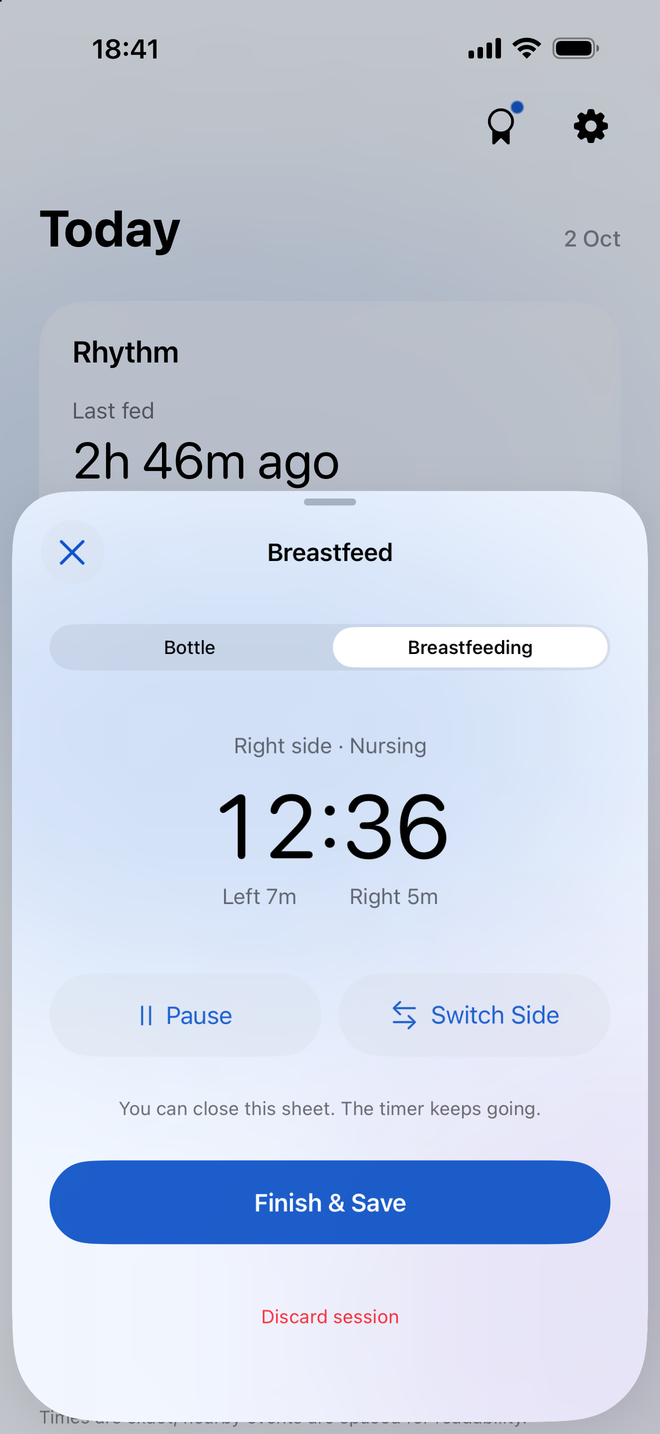
A nursing timer that follows the session
Start a breastfeeding session and choose the side you’re using. Milksy tracks left and right duration separately, with controls to pause, resume and switch sides.
The timer keeps running when you close the app. You can return to the active session instead of keeping the screen open throughout the feed.
Keep the detail you’ll want later
Save the session to add it to your feeding log. The timeline keeps its time and left/right durations together, so you can look back at the previous session before starting another.
If you forgot to stop the timer or entered something incorrectly, you can edit the saved breastfeeding entry.
See nursing alongside the rest of the day
Breastfeeding does not happen in isolation. Today also shows bottle feeds and diaper changes. If you combine nursing and bottles, both types of feed belong in the same history.
Trends show nursing duration from your saved sessions. Time spent nursing does not measure how much milk a baby has taken; the app records duration, not intake from breastfeeding.
Share the context with your partner
A shared timeline lets your partner see the breastfeeding sessions you saved, even if they weren’t there for the feed. CloudKit family sharing keeps activity synchronized between parents signed in to iCloud.
Useful questions
Does Milksy record both sides?
Yes. The breastfeeding timer tracks left and right nursing duration separately and lets you switch sides during a session.
Can I pause the nursing timer?
Yes. You can pause and resume an active breastfeeding session before saving it.
Do I need to leave the app open?
No. Milksy’s nursing timer keeps running when you close the app. Return to the app to manage or save the session.
A little less to remember.
Try Milksy on iPhone or iPad. Check the App Store for current compatibility and availability.
Download on the App Store