 Milksy Get Milksy
Which details will you want to keep?
Milksy vs Baby Tracker (Nighp)
Baby Tracker by Nighp is a better match for detailed growth records and PDF reports, with free core logging and paid options. Milksy may suit parents who want a focused daily timeline and iCloud sharing on iPhone or iPad. Both are practical loggers; choose by the records and devices you need.
Last updated: · By Milksy · Sources & method
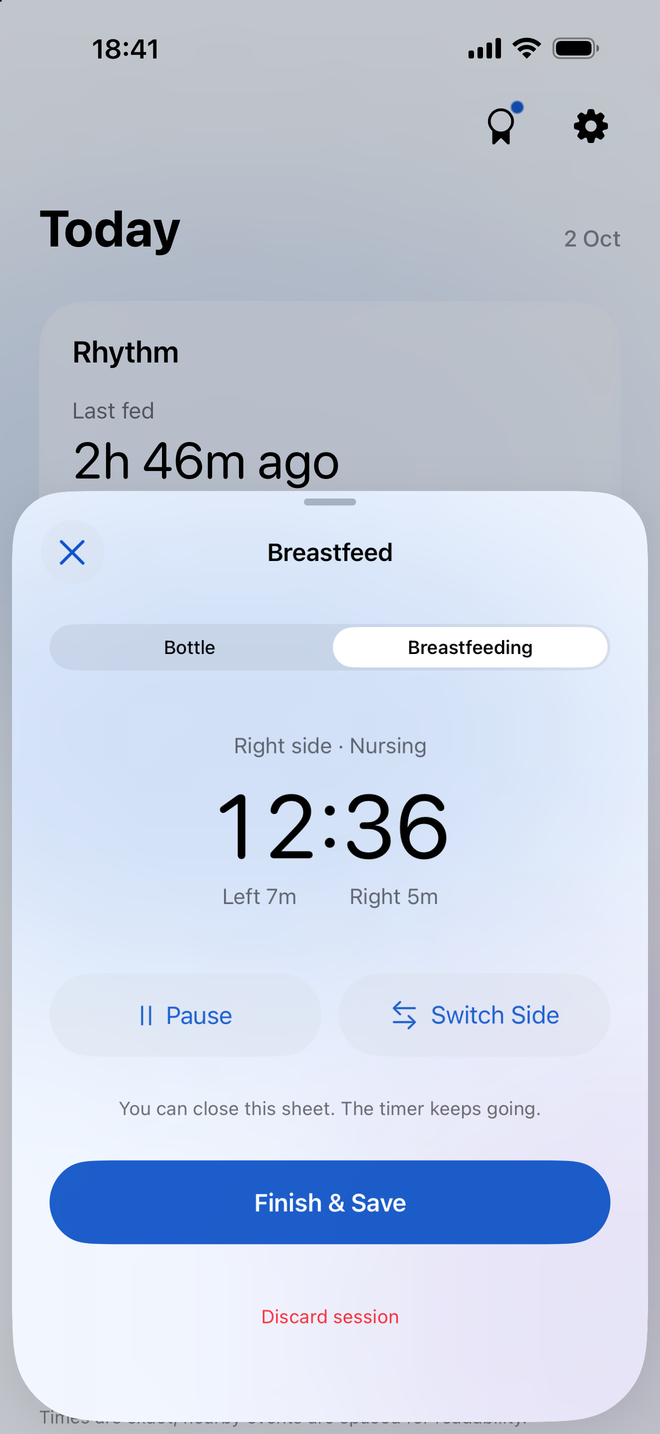
Try the task you do most
Here is Milksy’s nursing timer. Baby Tracker also has a nursing timer and shortcuts. Start with a real feed, an edited entry and a handover rather than deciding from a feature count.
See Baby Tracker (Nighp)’s official screenshotsMilksy and Baby Tracker (Nighp), side by side
Start with the features you need. A longer list only helps if you will use it.
| What matters | Milksy | Baby Tracker (Nighp) |
|---|---|---|
| Feeding tracking | Bottles, nursing and pumping | Bottles, nursing, pumping and solids |
| Breastfeeding | Left/right timer; pause and switch sides | Nursing timer and last side |
| Bottle tracking | Amount in mL and time | Formula and expressed milk logs |
| Diaper tracking | Wet, dirty or dry | Wet, dirty or mixed |
| Sleep tracking | Sleep logs and trends | Sleep timer; optional paid timing cues |
| Growth tracking | No weight, height or head-size charts | Measurements and WHO growth charts |
| Trends / statistics | Feeds, volume, diapers and sleep | Charts and daily / weekly / monthly reports |
| Partner / caregiver support | Private iCloud family invitation | Multiple devices in a sync group |
| Sync | Apple CloudKit; both parents need iCloud | Device sync; verify current setup in app |
| Logging controls | Plus menu, amount controls and timers | Timers, Siri Shortcuts and Quick Log on supported devices |
| Platforms | iPhone / iPad; iOS / iPadOS 26.5+ | iPhone, iPad, Apple Watch and Android |
| Pricing | Check the current App Store price | Free core logging. US listing: remove ads $4.99; Plus $5.99/mo or $49.99/yr. |
| Ads | No in-app ads | Advertising listed; paid ad removal available |
| Account requirements | No separate Milksy login; iCloud for sharing | Current login requirements not confirmed |
| Ease of loggingOur assessment | Designed for short entries from Today | Many shortcuts alongside detailed records |
| Overall complexityOur assessment | Focused daily log | Detailed logger, charts and optional cues |
USD prices checked on 3 October 2026. See sources and qualifications. Interface assessments are subjective.
Which Baby Tracker are we comparing?
This page is about Baby Tracker – Newborn Log by Nighp Software, the app linked in our sources. Several apps use similar names; their pricing and features are not interchangeable.
The meaningful choice here is a focused care timeline versus a wider record with growth charts, reports and optional timing cues. Both apps cover the everyday logging basics.
Where Baby Tracker is better
Baby Tracker includes measurements with WHO growth charts and PDF reports. If those records are part of your routine, it offers functionality Milksy does not. It also has Android availability.
Its current iOS listing describes optional What’s Next timing cues and a Plus subscription. Milksy does not offer predictive timing cues. Check device requirements and the actual purchase screen before choosing those extras.
Where Milksy may fit better
Milksy makes the day’s chronological activity the starting point, with bottle amounts and nursing durations kept distinct. It may be a better fit if you mostly look up the previous feed, record a diaper and hand over to your partner.
Milksy has no in-app ads. Baby Tracker’s listing declares advertising and offers paid ad removal. That is a practical difference if you want to avoid ads, rather than a reason to dismiss its free logger.
Check sharing and purchases separately
Baby Tracker supports multiple devices and sync groups. Its older public FAQ describes a previous sync setup, so we are not treating those steps as current instructions or assuming its current account requirements. Test the sharing flow on the actual devices your family uses.
The US listing shows a $4.99 Remove Ads purchase and Plus at $5.99 monthly or $49.99 yearly. The current description says core tracking remains free and existing purchases continue to work. Check the in-app offer for what each purchase unlocks; a paid timing tool is a different choice from simply removing ads.
Which fits your family?
You need growth charts or printable records
Choose Baby Tracker for its measurement charts and PDF reports.
You want a focused log on two Apple devices
Consider Milksy’s Today view and iCloud family invitation.
You need Android or want a free core logger
Baby Tracker is worth trying. Check the edition and sharing setup you will use.
Useful questions
Which Baby Tracker app is this?
Baby Tracker – Newborn Log by Nighp Software, US App Store ID 779656557. This comparison does not cover other apps with similar names.
Does Milksy have growth charts or PDF reports?
Milksy does not have weight, height or head-size growth charts, or Baby Tracker’s PDF reporting workflow. Milksy supports its own backup export and restore.
Does Baby Tracker require a subscription?
Its current iOS description says core tracking is free and existing purchases remain valid. Plus is a subscription for additional features. The US listing also includes a Remove Ads purchase; check the current in-app terms.
Sources and how we compare
Last updated: . We make Milksy. Competitor facts come from the official pages below; Milksy details come from its current implementation. This is a comparison of documented features, not a timed usability or sync test. “Ease of logging” and “Overall complexity” are our assessment.
Prices are the US listing or website figures shown when checked, in USD. Offers, taxes, eligibility and Android pricing can differ. A free download does not promise free access to every feature. Check the app’s purchase screen before paying. Unconfirmed details are marked in the table.
For Milksy’s storage and sharing details, see privacy and family sharing. Compare interfaces using the real Milksy screen on this page and each competitor’s official store screenshots.
Track the useful stuff.
Then get on with your day.
Milksy is for parents who want to track the useful stuff without turning baby tracking into another job. If that sounds like you, try its daily timeline on iPhone or iPad.
See Milksy on the App Store